Creating a new user: Difference between revisions
From Voror_Wiki
More actions
No edit summary |
No edit summary |
||
| Line 9: | Line 9: | ||
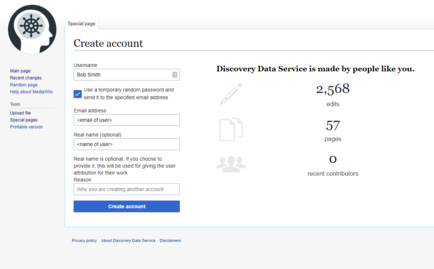
#Provide a username, email address and optional real name, select '''Use a temporary random password and send it to the specified email address''', and then click '''Create account'''. | #Provide a username, email address and optional real name, select '''Use a temporary random password and send it to the specified email address''', and then click '''Create account'''. | ||
#:The '''Account created''' page is displayed and an email is sent to the new user. | #:The '''Account created''' page is displayed and an email is sent to the new user. | ||
#:[[File:Create account.png|none|thumb|434x434px]] | |||
Revision as of 09:44, 28 August 2020
The DDS wiki is a publicly accessible resource with unlimited read-only access. However, some functionality requires users to have a registered user profile.
| You cannot create your own registered user profile. Contact the Project Manager for your project if you need a user creating. |
- Log into your DDS wiki user account and then in the left menu click Special pages.
- In Login/create account, click Create account.
- Provide a username, email address and optional real name, select Use a temporary random password and send it to the specified email address, and then click Create account.
- The Account created page is displayed and an email is sent to the new user.