
Adding a new page to the wiki: Difference between revisions
From Voror_Wiki
More actions
No edit summary |
No edit summary |
||
| Line 20: | Line 20: | ||
===Search for a page=== | ===Search for a page=== | ||
# In the '''Search''' bar, type the name of the page you want to create and click [[File:Watchlist star.png|none|thumb|621x621px]] | # In the '''Search''' bar, type the name of the page you want to create and click <i class="fas fa-search"></i>.[[File:Watchlist star.png|none|thumb|621x621px]] | ||
# | # | ||
<span id="url"></span> | <span id="url"></span> | ||
===Type the page title in your web browser address bar=== | ===Type the page title in your web browser address bar=== | ||
[[Category:Wiki tips]] | [[Category:Wiki tips]] | ||
Revision as of 11:53, 26 August 2020
Use one of the following ways to create a new wiki page:
- Create a link to a non-existent page
- Search for a page
- Type the page title in your web browser address bar
Create a link to a non-existent page
If you want to create a link to a new page from an existing page, you can create a new page by adding a link.
- In the editor menu bar, click the link icon and type the name of the new page, for example <New page>.
Pages that do not exist are displayed in red text. 
- Click the <New page> link.
- Click create this page.
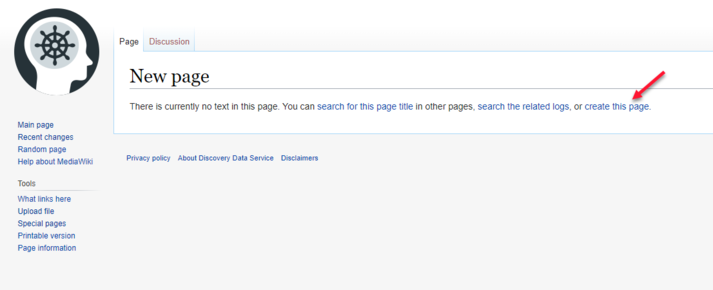
- The Creating <New page> page is displayed.

- Click Save page to save your new page.


Search for a page
- In the Search bar, type the name of the page you want to create and click .

