
Record Viewer/Appointments: Difference between revisions
From Voror_Wiki
More actions
No edit summary |
|||
| (8 intermediate revisions by 2 users not shown) | |||
| Line 1: | Line 1: | ||
Appointments displays bookings of healthcare events among patients, practitioners, and/or related persons. | Appointments displays bookings of healthcare events among patients, practitioners, and/or related persons. | ||
Use this section to help you to: | Use this section to help you to: | ||
| Line 7: | Line 8: | ||
== View Appointments == | == View Appointments == | ||
#[[Access Record Viewer]]. | #[[Accessing Record Viewer|Access Record Viewer]].[[File:RecordViewer Appointments Page.png|thumb|800x800px|Example Appointments screen]] | ||
#If required, in the [[Record Viewer/Patient demographics/RV navigation side menu|Record Viewer navigation side menu]], click <i class="fas fa-calendar-alt fa-lg"></i> '''Appointments''' . | #If required, in the [[Record Viewer/Patient demographics/RV navigation side menu|Record Viewer navigation side menu]], click <i class="fas fa-calendar-alt fa-lg"></i> '''Appointments''' . | ||
#: | #:Appointments displays the following details for the '''selected patien'''<span class="mw-customtoggle-demographic fad fa-fw fa-lightbulb green-tip"></span>'''t''': | ||
#:<div class="mw-collapsible mw-collapsed">{{Demographic}}</div> | #:<div class="mw-collapsible mw-collapsed" id="mw-customcollapsible-demographic">{{Demographic}}</div> | ||
#:*''' | #:*'''Schedule type''' | ||
#:*''' | #:*'''Location''' | ||
#:*''' | #:*'''Date of appointment''' | ||
#Click to expand specific conditions and display the following details: | #:*'''Appointment duration''' | ||
#:*'''Delay time''' | |||
#:*'''Appointment status''' | |||
#:**Arrived | |||
#:**Attended | |||
#:**Booked | |||
#:**Cancelled | |||
#:**Did not attend | |||
# Click to expand specific conditions and display the following details: | |||
#:*Source of data | #:*Source of data | ||
{{Filter}} | {{Filter}} | ||
Latest revision as of 21:50, 4 December 2025
Appointments displays bookings of healthcare events among patients, practitioners, and/or related persons.
Use this section to help you to:
View Appointments
- Access Record Viewer.
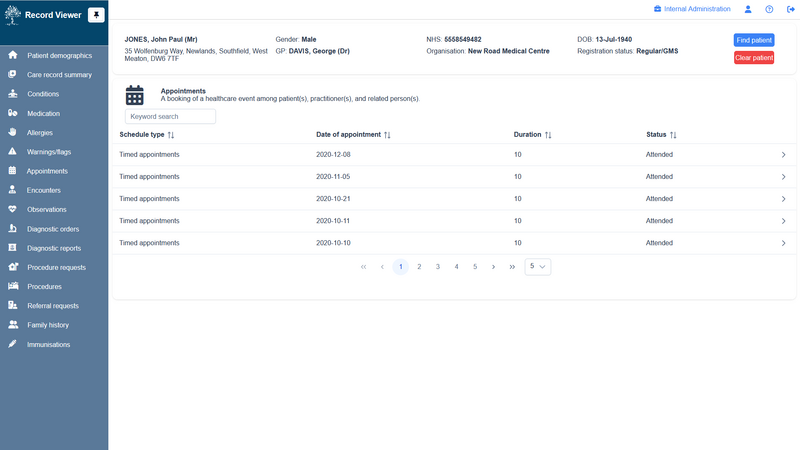
Example Appointments screen - If required, in the Record Viewer navigation side menu, click Appointments .
- Appointments displays the following details for the selected patient:
Patient demographic bar
The selected patient's demographic details (name, address, gender, usual GP, NHS number organisation, date of birth, and registration status are displayed throughout Record Viewer.
Click Swap patient to select and view details for a different patient.- Schedule type
- Location
- Date of appointment
- Appointment duration
- Delay time
- Appointment status
- Arrived
- Attended
- Booked
- Cancelled
- Did not attend
- Click to expand specific conditions and display the following details:
- Source of data

| Filter Use a text search to narrow down the displayed items; matching items are displayed as you type the required search term. |
See also: