Care record summary displays a summary of the selected patient's key care record events.
Care record summary displays a summary of the selected patient's key care record events.
Use this section to help you to view:
Use this section to help you to:
*[[Record Viewer/Care record summary#care record summary|Care record summary]]
*[[Record Viewer/Care record summary#care record summary|View Care record summary]]
<span id="care record summary"></span>
<span id="care record summary"></span>
== View Care record summary ==
== View Care record summary ==
#[[Access Record Viewer]].
#[[Accessing Record Viewer|Access Record Viewer]].
# If required, in the [[Record Viewer/Patient demographics/CRV navigation side menu|Record Viewer navigation side menu]], click <i class="fas fa-notes-medical fa-lg"></i> '''Care record summary''' .
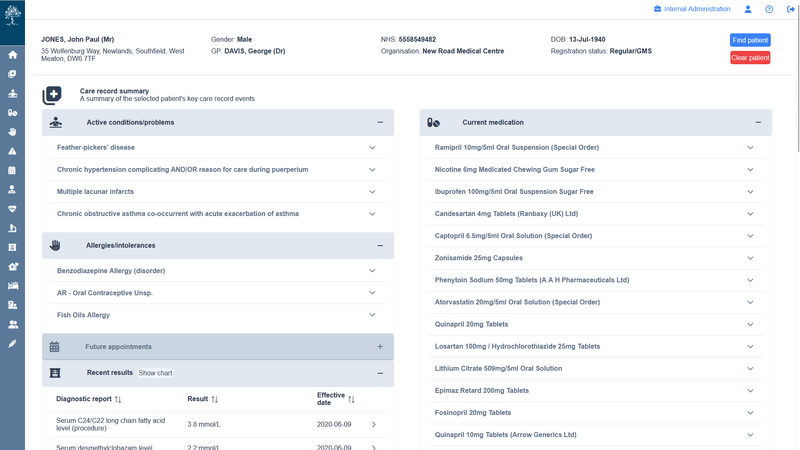
#[[File:RecordViewer Summary Page.png|alt=|thumb|800x800px|Example Care Record Summary screen]]If required, in the [[Record Viewer/Patient demographics/RV navigation side menu|Record Viewer navigation side menu]], click <i class="fas fa-notes-medical fa-lg"></i> '''Care record summary''' .
#:{{Info| Care record summary is the default view.}}The Care record summary displays the following key care events for the selected patient:
#:{{Info| Care record summary is the default view.}}The Care record summary displays the following key care events for the selected patient:
#:*'''Active conditions/problems'''
#:*'''Active conditions/problems'''
Latest revision as of 22:04, 4 December 2025
Care record summary displays a summary of the selected patient's key care record events.
The Care record summary displays the following key care events for the selected patient:
Active conditions/problems
Allergies & intolerances
Health status
Current medication
Recent encounters
Warnings & flags
Click to expand specific care record events and display the following details:
Active conditions/problems:
Status
Onset date
Source of data
Practitioner
Allergies & intolerances:
Effective date
Source of data
Practitioner
Health status:
Source of data
Practitioner
Current medication:
Type
Dosage
Status
Last issued
Quantity
Practitioner
Source of data
Start date
Recent encounters:
Source of data
Practitioner
Warnings & flags:
Status
Source of data
Onset date
Patient demographic bar The selected patient's demographic details (name, address, gender, usual GP, NHS number organisation, date of birth, and registration status are displayed throughout Record Viewer. Click Swap patient to select and view details for a different patient.